


Find your music’s qualifying Spotify playlist stats in Spotify for Artists under Music > Playlists. For a particular song, check its Source of Streams to see how listeners found it.
An artist account cannot show unrestricted listening analytics for every Spotify playlist. A playlist’s follower count is not the number of people who played your track.
Table of content
Introduction
Key Takeaways
What do the playlist numbers measure?
Where can I find my playlist and listening data?
Is a playlist worth pitching?
How do I judge a placement?
What can a playlist rater or analyzer tell me?
Which pitching routes and offers should I check?
What should I do with playlist attention?
Frequently Asked Questions
Conclusion
Key Takeaways
Find qualifying playlist activity under Music > Playlists in Spotify for Artists. It is not a list of every playlist containing your track.
Check Source of Streams to distinguish discovery through other people’s playlists from listening through a fan’s own library or playlist.
Before pitching, judge a playlist by its recent songs, sequence, audience premise and curator route, not its follower count alone.
After a placement, compare similar periods. Look beyond streams to saves, repeat listening and intentional listening, while accounting for other promotion.
Treat analyzer scores as estimates, check fees and account permissions, and avoid offers promising placement or streams.
What do the playlist numbers measure?
A playlist appearance tells you where your music has been found, subject to Spotify’s reporting limits. It does not mean everyone following that playlist heard the song. Spotify counts a song stream after at least 30 seconds of play; listeners count people rather than plays. Streams per listener can therefore help distinguish one-off exposure from repeat listening. A save is counted when someone taps the plus button to add music to their library. A playlist add, an artist follow and a playlist follow are different actions; none is a substitute for a stream count.
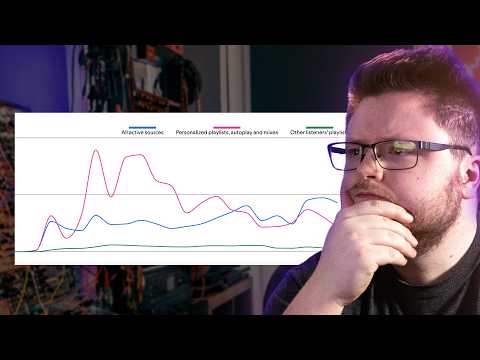
The useful distinction is programmed versus active listening. Spotify groups another listener’s playlist under programmed sources, and a listener’s own playlists and library under active sources. The same person can appear across source categories, so listener subtotals need not add up to the overall total. See Spotify’s Source of Streams definitions before interpreting a change as new fan interest.
Where can I find my playlist and listening data?
Get access to Spotify for Artists for your artist profile. If the team already has access, ask its Admin for an invitation; otherwise request to claim the profile. An eligible preferred distributor may also offer an access route. Spotify’s access instructions explain those options.
Open Music > Playlists to see the qualifying playlists bringing listeners to your music. Spotify’s playlist-list guide explains what appears there.
For the song or release you are assessing, open its overview and look under Segmentation > Source of Streams. The Audience overview also has this breakdown. Choose a suitable period and metric, then compare streams, listeners and streams per listener where the filters allow. Spotify’s source guide gives the available views.
No playlist shown? Spotify lists only the top 100 playlists by listeners of your music, requires at least three listeners on a playlist for it to appear, and looks back 12 months. An absent playlist is therefore not proof that your song was never added. Check the playlist-list limits before drawing that conclusion.
Allow for reporting time when reviewing a new addition. Spotify for Artists stats update approximately daily and use UTC days. A new release’s live stream count during its first seven days is not a live, playlist-by-playlist report.
Is a playlist worth pitching?
Open the live playlist and play several recent selections in order. Would your song make sense beside them, at the energy level and point in the sequence where a listener might encounter it? Compare the vocals, mood and pacing of current tracks with your specific song rather than relying on a broad genre label.
Read the description and curator profile. Ask why someone follows the playlist, whether that reason suits your track, who appears to run it and whether the curator states a submission route. Use the route they provide; no stated route does not mean you need to buy access. Followers and recent changes, if visible, may prompt further questions, but neither they nor a tool’s audience estimate tell you how many people heard your track or prove misconduct.
Example: choose the smaller fit: An independent artist has a quiet indie-soul single. One large playlist mostly features high-energy dance tracks; a smaller one regularly places intimate, vocal-led songs together. The artist shortlists the smaller playlist because its current listening context fits the single, not because its followers promise a particular number of plays. This is an illustrative choice, not a forecast.
How do I judge a placement?
Record the playlist name, the date your song appeared and a baseline for the song. Note any release, press or social activity occurring at the same time.
After the data updates, compare similar-length periods before and after the addition. Inspect playlist activity and the song’s Source of Streams rather than treating an artist-wide stream spike as a playlist result.
Look for signs of further interest: saves, repeat listening, active-source listening, artist follows or plays of other songs. Compare them with your own usual pattern; these figures establish no universal conversion target.
For the indie-soul single, the artist logs the smaller playlist’s addition date. If programmed listening rises, that is useful discovery; if saves and later active listening also rise, it is a reason to keep exploring that audience. If plays rise but further interest does not, the artist checks whether the placement and the song’s listening path suited those listeners before paying for more exposure. Neither outcome proves that this playlist alone caused the change, especially if a post or press feature ran that week.
For a longer view, Spotify’s audience segments distinguish monthly active listeners, who intentionally played the artist from active sources within 28 days, from programmed listeners, whose listening in the relevant period came only from programmed sources. A shift in those artist-level groups can guide follow-up, but it cannot identify which playlist persuaded an individual listener.

What can a playlist rater or analyzer tell me?
A search for “Spotify playlist rater” might mean a taste-rating novelty or a tool scoring a playlist’s pitching prospects. “Spotify playlist analysis”, “Spotify playlist analyzer” and “analyze Spotify playlist” can mean examining its tracks and public signals. Neither type of tool gives you unrestricted private analytics for somebody else’s playlist. Spotify for Artists measures listening around your own music.
For example, artist.tools advertises playlist analysis including follower history, estimated monthly playlist listeners, genre and artist breakdowns, bot checks and curator contacts. Its estimates and quality ratings are the provider’s assessments, not Spotify-audited listener counts or definitive bot findings. Use them to decide what to inspect in the live playlist.
Before using a tool, check its current fee, what you receive, which data it estimates and what account permissions it requests. Spotify requires permission for linked apps and explains how to remove access. Do not assume every analyzer can retrieve audio features or arbitrary third-party playlist tracks through Spotify’s API: Spotify restricts audio-feature access for new API use cases, and its Playlist Items endpoint has owner or collaborator access conditions. Those limits alone do not explain how a particular commercial tool produces its figures.
Which pitching routes and offers should I check?
Stats help you choose a relevant route; they do not secure a placement. An Admin or Editor can pitch one eligible upcoming, unreleased song at a time to Spotify editors through Music > Upcoming. Spotify’s editorial pitching instructions make clear that placement is not guaranteed. Independent curators have their own stated submission routes; Musosoup’s playlist-pitching guide covers the fuller workflow.
A clearly described fee for research or review is different from paying for a promised result. Check the price and deliverable before agreeing to a service. Avoid guaranteed streams or playlist placement: Spotify warns that paid third-party services making those promises are not legitimate. A fee or an unusual growth chart by itself is not proof of artificial streaming.
An unexpected spike needs a check, not a verdict: Record the playlist and dates, review where the streams came from, and use Spotify’s suspicious-playlist reporting route if you have a concern. Confirmed artificial streams may be excluded from public counts or royalties even while a spike remains visible in private Spotify for Artists data. A chart alone cannot establish that a curator used bots.
What should I do with playlist attention?
Playlist followers are not earnings. Spotify distinguishes recording and publishing royalties and does not pay artists a fixed amount per stream; payments depend on rightsholder arrangements. Recorded-music royalty-pool eligibility also has track-level requirements, so use your label or distributor statements for payment questions. Musosoup’s Spotify royalties guide covers the wider calculation.
Give an interested listener a reason to find the song again: share a song-led clip, make it easy to find your artist profile, or approach press whose readers suit the release. Note those activities in your results log so you do not credit every later play to the playlist. For detailed follow-up, see Musosoup’s guides to promoting a song on Instagram and planning music promotion.
Frequently Asked Questions
Can I see stats for any Spotify playlist?
No. You can inspect a playlist’s visible contents and public signals, but Spotify for Artists reports qualifying playlist activity for your music, not another curator’s complete private listening data. Spotify explains its artist playlist list and its visibility limits.
When should I check the results of a new placement?
Record the addition date, then wait for the daily stats update before comparing like-length periods. Spotify counts days in UTC, so a late-evening addition in your time zone may fall on a different reporting day. Its first-seven-days live release counter tracks streams, not live results for an individual playlist. Check Spotify’s update guidance if the dates appear out of step.
Do playlist followers count as monthly listeners or streams?
No. Following a playlist does not mean someone played your track. Spotify counts a song stream after at least 30 seconds of play, while its monthly active listener segment concerns people who intentionally played your music from active sources in a 28-day period.
Can a Spotify playlist rater tell me if a playlist is safe?
No score establishes that on its own. Check the live track selection, the curator’s route and what a tool’s rating actually measures. Treat an automated warning as a reason to investigate, not a verdict about the playlist.
What if I want stats for a playlist I curate myself?
That is a different task from measuring how your song performed after someone else added it. Start with Musosoup’s playlist curator guide for decisions about building and managing a playlist you own.
Conclusion
Choose one song: inspect its playlists and listening sources, shortlist a playlist that genuinely fits it, and note a baseline and review date. After any placement, check what listeners did next. Then choose a relevant social or press follow-up rather than chasing the largest follower count.
Subscribe to our newsletter
Stay updated with the latest Muso news, tips, and success stories. Subscribe to our newsletter and never miss an update!


